

Tax Configuration for One-Time Payments
Different countries have different tax rules and regulations for different products. Within the same country, different products may also be taxed differently based on the applicable jurisdiction. TransactBridge allows merchants to automate tax calculation for one-time payments without maintaining tax logic and rules in their own systems. Tax rules can be configured for different products and jurisdictions at our end and are automatically applied during billing.Tax configuration helps automate tax calculation for one-time payments, reducing manual effort and improving tax compliance.
Business Use Cases
Example
Product Price
- Product Price: ₹2,000
- Applicable GST: 18%
During checkout, the configured tax is automatically applied to the one-time purchase. The generated invoice contains the complete tax breakdown for the customer.
How It Works
- The merchant configures the applicable tax rules for their products and supported jurisdictions with TransactBridge.
- The customer initiates a one-time purchase.
- TransactBridge identifies the applicable tax configuration based on the product and customer’s jurisdiction.
- The applicable tax is automatically calculated and added to the purchase amount.
- The customer pays the final amount, including the applicable tax.
- An invoice is generated with the itemized tax breakdown.
GST Inclusive and Exclusive Configuration
TransactBridge supports both tax-inclusive and tax-exclusive pricing configurations. This configuration determines whether the applicable GST is included in the product price or added separately during billing.GST Exclusive
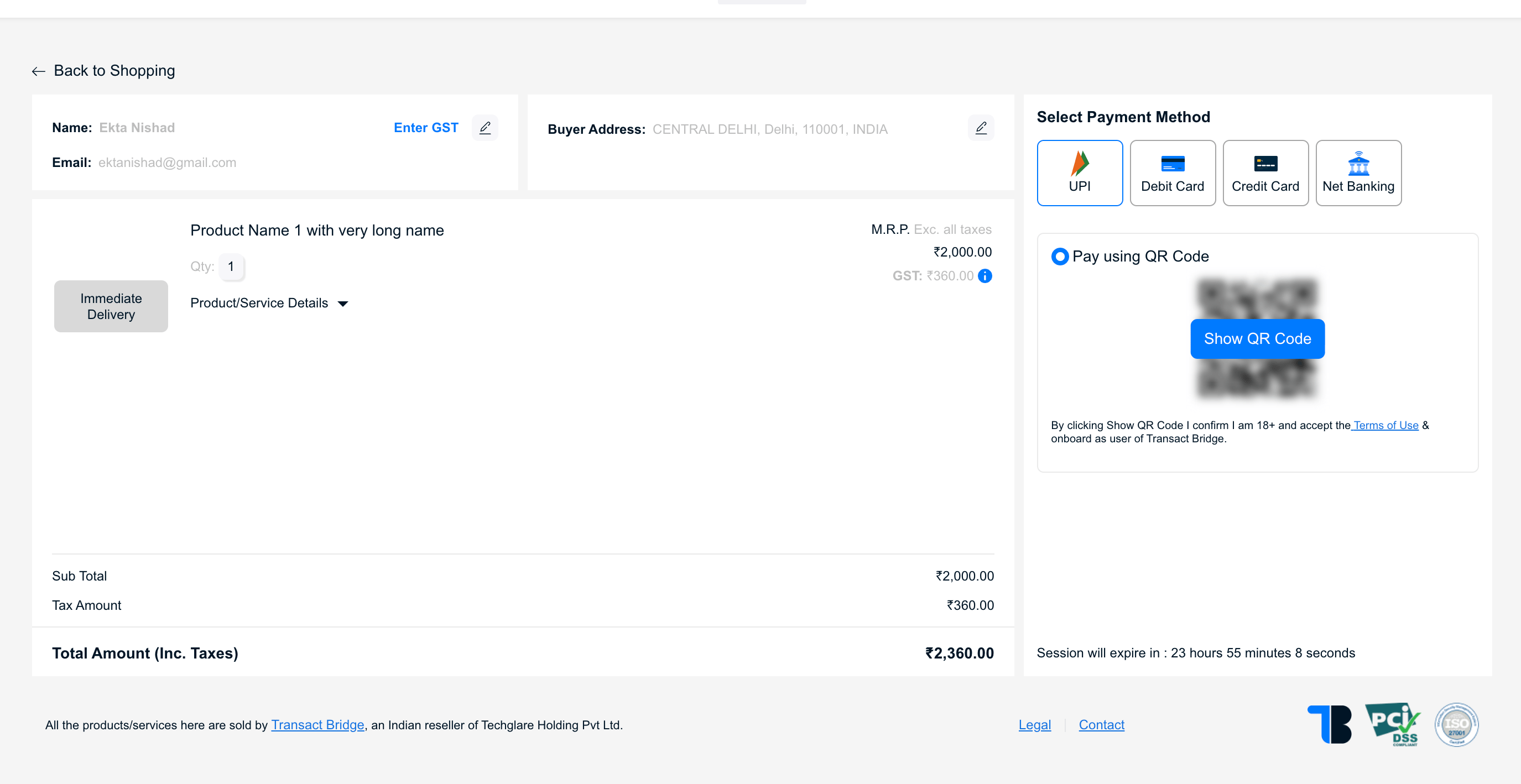
In a GST-exclusive configuration, the product price does not include GST. The applicable GST is calculated on the product price and added to the final payable amount. Example:- Product Price: ₹2,000
- GST Rate: 18%
- GST Amount: ₹360
- Total Payable: ₹2,360
Calculation: ₹2,000 + (₹2,000 × 18%) = ₹2,360
GST Inclusive
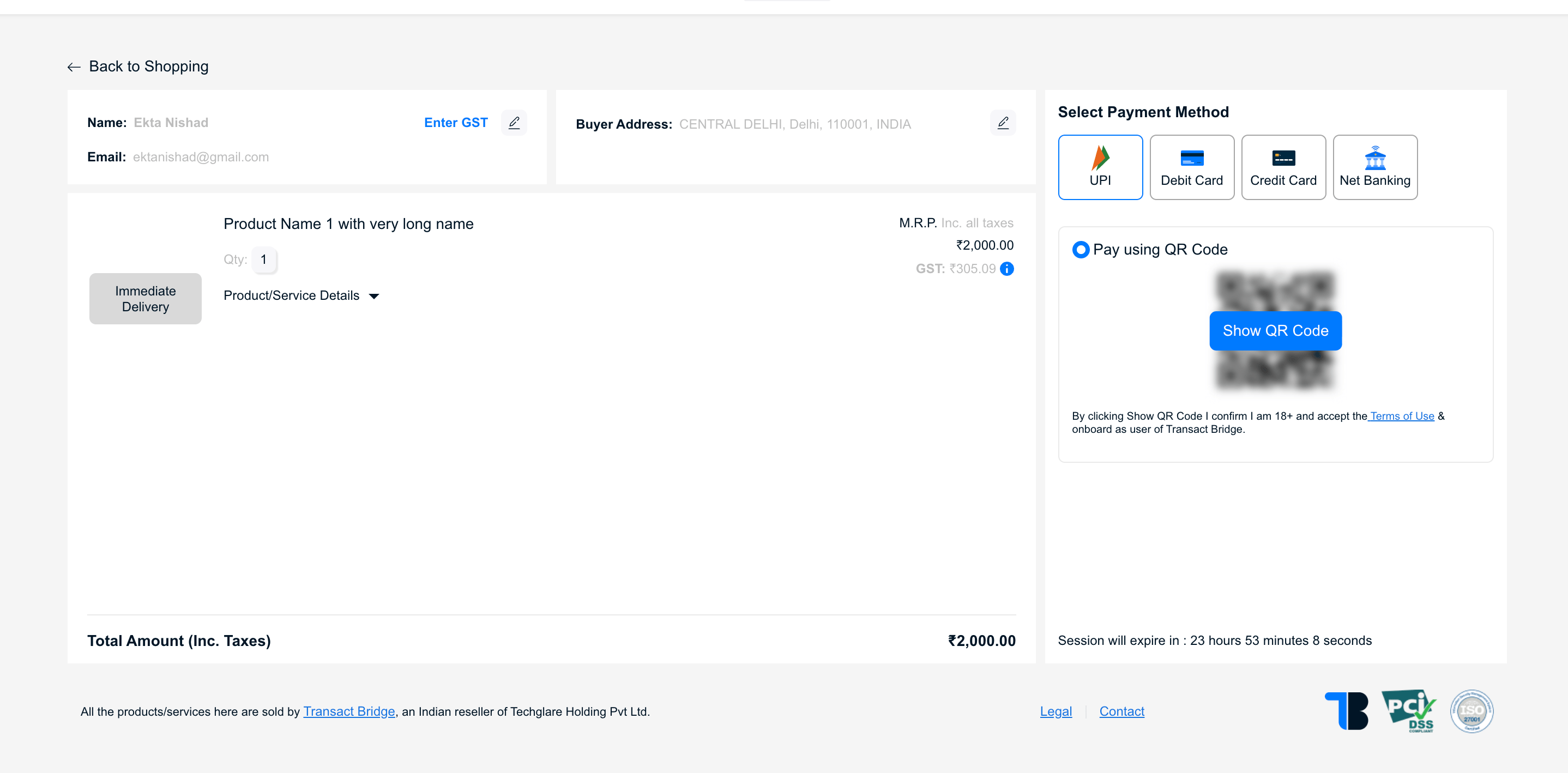
In a GST-inclusive configuration, the product price already includes GST. TransactBridge calculates the GST component from the total product price instead of adding GST on top of it. Example:- Product Price: ₹2,000
- GST Rate: 18%
- GST included in price: ₹305.09
- Taxable Amount: ₹1,694.92
- Total Payable: ₹2,000
Calculation: ₹2,000 ÷ 1.18 = ₹1,694.92 taxable amount
Inclusive vs. Exclusive
How Configuration Works
The tax configuration determines how TransactBridge calculates the final amount during billing.Key Difference
GST Exclusive: The configured price is the amount before tax. GST is calculated and added to the price.
GST Inclusive: The configured price is the final amount. GST is calculated as a component of the existing price.
GST inclusive and exclusive configurations help in managing tax calculations effectively based on the business requirements. This is configuration based. To get this configured please reach out to TransactBridge support team.
Benefits
- Automated tax calculation for one-time payments
- Tax-compliant invoice generation
- Reduced manual effort and calculation errors
- Consistent tax application across products and jurisdictions
- Simplified financial reporting and reconciliation
- No need to maintain tax logic and rules in the merchant’s system