> ## Documentation Index
> Fetch the complete documentation index at: https://developer.transactbridge.com/llms.txt
> Use this file to discover all available pages before exploring further.
# Taxation
## Tax Configuration for One-Time Payments
Different countries have different tax rules and regulations for different products. Within the same country, different products may also be taxed differently based on the applicable jurisdiction.
TransactBridge allows merchants to automate tax calculation for **one-time payments** without maintaining tax logic and rules in their own systems. Tax rules can be configured for different products and jurisdictions at our end and are automatically applied during billing.
> Tax configuration helps automate tax calculation for one-time payments, reducing manual effort and improving tax compliance.
## Business Use Cases
| Business Use Case | Description | Example |
| ------------------------------------- | ------------------------------------------------------------------------------------- | ---------------------------------------------------------------------------------------------------------------------------------- |
| **Digital Products** | Apply applicable taxes when customers purchase digital products. | An eBook priced at ₹500 is purchased by a customer, and the configured GST is automatically added to the payment. |
| **Software Licenses** | Calculate applicable taxes on one-time software license purchases. | A software license priced at ₹5,000 is purchased, and the applicable tax is automatically calculated before payment. |
| **Online Courses** | Apply taxes to one-time purchases of courses and educational content. | An online course priced at ₹3,000 is purchased, and the configured GST is added to the final payable amount. |
| **Global Merchants Selling in India** | Apply the applicable Indian taxes when selling one-time products to Indian customers. | A US-based merchant sells a digital product to an Indian customer, and the configured Indian tax is automatically applied. |
| **Invoice Generation** | Generate invoices containing itemized tax details for each completed payment. | After a successful payment, the customer receives an invoice showing the product amount, applicable tax, and total payable amount. |
| **Financial Reconciliation** | Maintain accurate tax records for accounting and reporting. | Finance teams can reconcile one-time collections using invoices containing the applicable tax breakdown. |
## Example
### Product Price
* Product Price: **₹2,000**
* Applicable GST: **18%**
| Description | Amount |
| ----------------- | ---------: |
| Product Amount | ₹2,000 |
| GST (18%) | ₹360 |
| **Total Payable** | **₹2,360** |
During checkout, the configured tax is automatically applied to the one-time purchase. The generated invoice contains the complete tax breakdown for the customer.
***
## How It Works
1. The merchant configures the applicable tax rules for their products and supported jurisdictions with TransactBridge.
2. The customer initiates a one-time purchase.
3. TransactBridge identifies the applicable tax configuration based on the product and customer's jurisdiction.
4. The applicable tax is automatically calculated and added to the purchase amount.
5. The customer pays the final amount, including the applicable tax.
6. An invoice is generated with the itemized tax breakdown.
***
## GST Inclusive and Exclusive Configuration
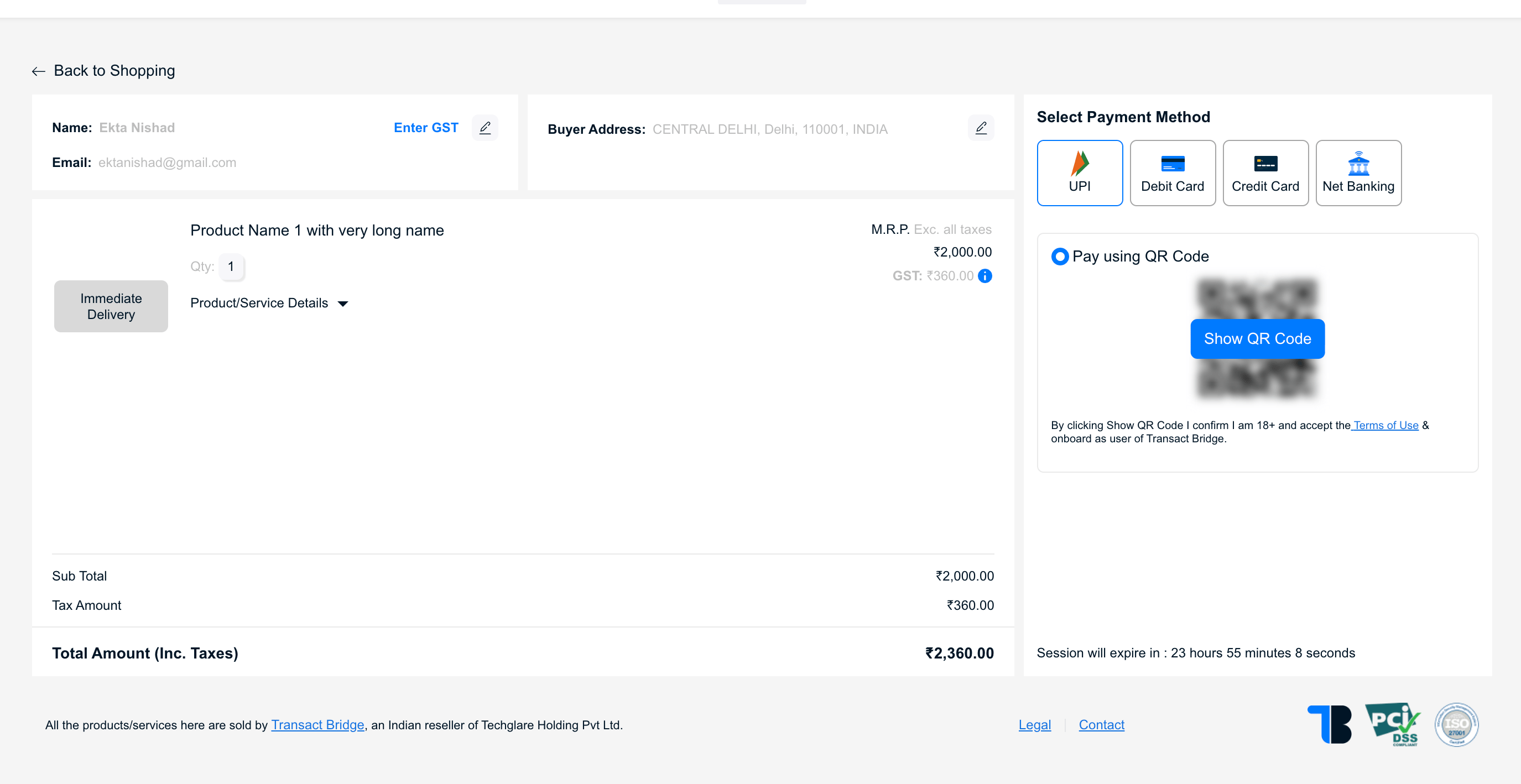
TransactBridge supports both **tax-inclusive** and **tax-exclusive** pricing configurations. This configuration determines whether the applicable GST is included in the product price or added separately during billing.
### GST Exclusive
In a **GST-exclusive** configuration, the product price does not include GST. The applicable GST is calculated on the product price and added to the final payable amount.
**Example:**
* Product Price: **₹2,000**
* GST Rate: **18%**
* GST Amount: **₹360**
* Total Payable: **₹2,360**
| Description | Amount |
| ----------------- | ---------: |
| Product Price | ₹2,000 |
| GST (18%) | ₹360 |
| **Total Payable** | **₹2,360** |
> **Calculation:** ₹2,000 + (₹2,000 × 18%) = ₹2,360
 ### GST Inclusive
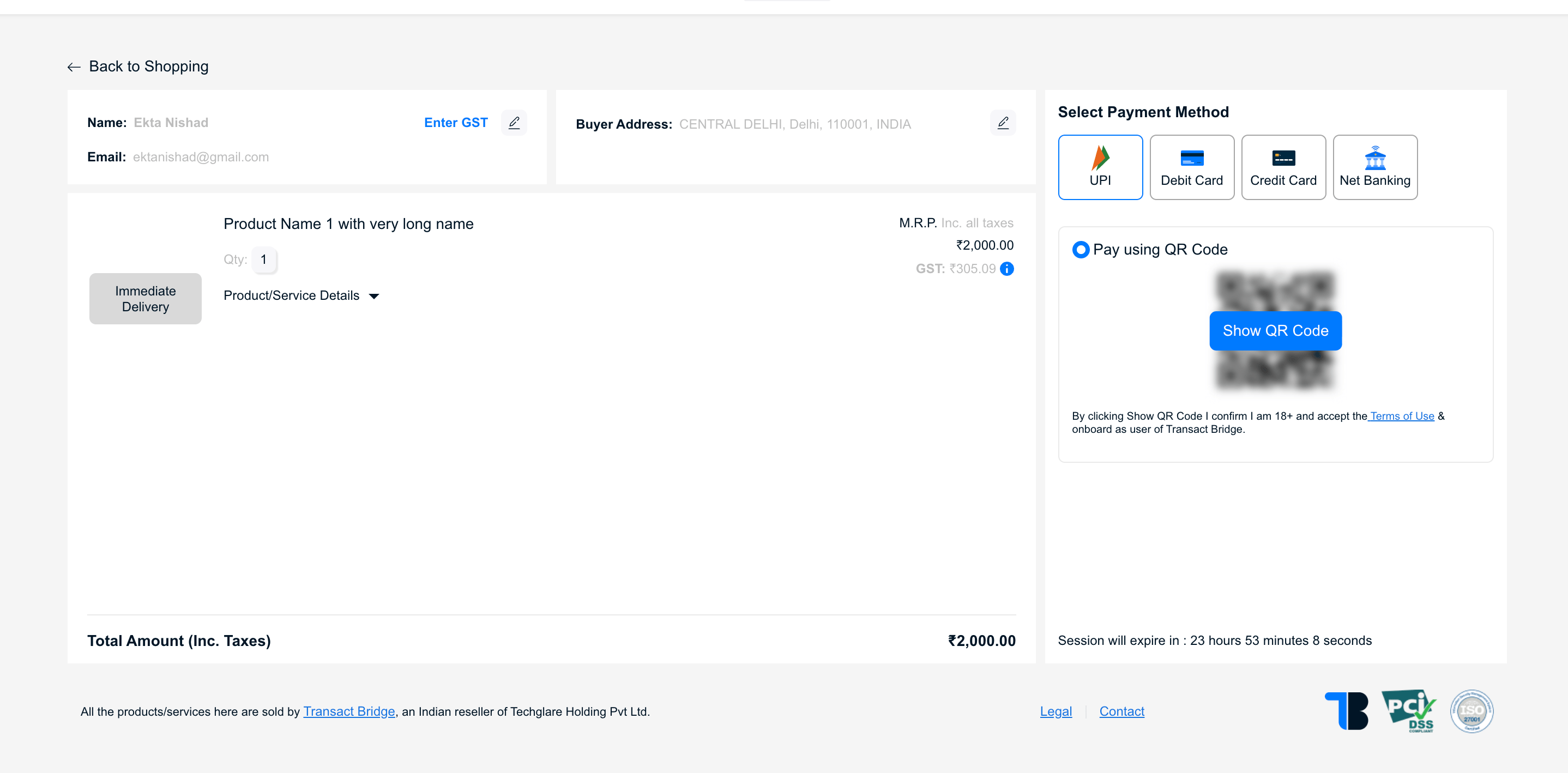
In a **GST-inclusive** configuration, the product price already includes GST. TransactBridge calculates the GST component from the total product price instead of adding GST on top of it.
**Example:**
* Product Price: **₹2,000**
* GST Rate: **18%**
* GST included in price: **₹305.09**
* Taxable Amount: **₹1,694.92**
* Total Payable: **₹2,000**
| Description | Amount |
| ----------------- | ---------: |
| Taxable Amount | ₹1,694.92 |
| GST (18%) | ₹305.08 |
| **Total Payable** | **₹2,000** |
> **Calculation:** ₹2,000 ÷ 1.18 = ₹1,694.92 taxable amount
### GST Inclusive
In a **GST-inclusive** configuration, the product price already includes GST. TransactBridge calculates the GST component from the total product price instead of adding GST on top of it.
**Example:**
* Product Price: **₹2,000**
* GST Rate: **18%**
* GST included in price: **₹305.09**
* Taxable Amount: **₹1,694.92**
* Total Payable: **₹2,000**
| Description | Amount |
| ----------------- | ---------: |
| Taxable Amount | ₹1,694.92 |
| GST (18%) | ₹305.08 |
| **Total Payable** | **₹2,000** |
> **Calculation:** ₹2,000 ÷ 1.18 = ₹1,694.92 taxable amount
 ### Inclusive vs. Exclusive
| Configuration | Product Price | GST Treatment | Total Payable |
| ----------------- | ------------: | -------------------------------------------- | ------------- |
| **GST Exclusive** | ₹2,000 | GST is added to the product price | **₹2,360** |
| **GST Inclusive** | ₹2,000 | GST is already included in the product price | **₹2,000** |
### How Configuration Works
The tax configuration determines how TransactBridge calculates the final amount during billing.
```mermaid theme={null}
flowchart TD
A[Product Price] --> B{Tax Configuration}
B -->|Exclusive| C[Calculate GST on Product Price]
C --> D[Add GST to Product Price]
D --> E[Final Amount]
B -->|Inclusive| F[Extract GST from Product Price]
F --> G[Separate Taxable Amount and GST]
G --> E[Final Amount]
```
### Key Difference
> **GST Exclusive:** The configured price is the amount before tax. GST is calculated and added to the price.
> **GST Inclusive:** The configured price is the final amount. GST is calculated as a component of the existing price.
GST inclusive and exclusive configurations help in managing tax calculations effectively based on the business requirements. This is configuration based. To get this configured please reach out to TransactBridge support team.
## Benefits
* Automated tax calculation for one-time payments
* Tax-compliant invoice generation
* Reduced manual effort and calculation errors
* Consistent tax application across products and jurisdictions
* Simplified financial reporting and reconciliation
* No need to maintain tax logic and rules in the merchant's system
### Inclusive vs. Exclusive
| Configuration | Product Price | GST Treatment | Total Payable |
| ----------------- | ------------: | -------------------------------------------- | ------------- |
| **GST Exclusive** | ₹2,000 | GST is added to the product price | **₹2,360** |
| **GST Inclusive** | ₹2,000 | GST is already included in the product price | **₹2,000** |
### How Configuration Works
The tax configuration determines how TransactBridge calculates the final amount during billing.
```mermaid theme={null}
flowchart TD
A[Product Price] --> B{Tax Configuration}
B -->|Exclusive| C[Calculate GST on Product Price]
C --> D[Add GST to Product Price]
D --> E[Final Amount]
B -->|Inclusive| F[Extract GST from Product Price]
F --> G[Separate Taxable Amount and GST]
G --> E[Final Amount]
```
### Key Difference
> **GST Exclusive:** The configured price is the amount before tax. GST is calculated and added to the price.
> **GST Inclusive:** The configured price is the final amount. GST is calculated as a component of the existing price.
GST inclusive and exclusive configurations help in managing tax calculations effectively based on the business requirements. This is configuration based. To get this configured please reach out to TransactBridge support team.
## Benefits
* Automated tax calculation for one-time payments
* Tax-compliant invoice generation
* Reduced manual effort and calculation errors
* Consistent tax application across products and jurisdictions
* Simplified financial reporting and reconciliation
* No need to maintain tax logic and rules in the merchant's system